
We’re excited to announce the most recent addition to Litmus Email Previews: Libero.
Libero was the first local provider to introduce a free webmail service to the Italian market—and Libero Mail still is a popular service today. As of May 2017, Libero was home to about 8 million active email accounts.
If you’re catering to an Italian email audience, it’s important to make sure that your email looks great in Libero inboxes. With Litmus Email Previews, you can now see how your email renders in Libero, so you can spot and fix errors before you hit send.
 |
Optimize your email for International inboxesTest your email in popular international webmail clients, including Libero, with Litmus Email Previews—and catch rendering errors before you send. |
We took a close look at the Libero inbox and how it renders email. Here’s what we found.
Inbox View
|
Subject line length |
79 characters for unread mail, 89 for read mail |
|
Emoji support in subject line |
 |
|
Preview text support |
 |
|
Preview text length |
N/A |
|
Auto sorting (Folder or Tabs) |
Primary, Promotions, and Social* |
* tabs can be manually enabled and disabled by the user
Focus on your subject lines
With no preview text support, focusing on a powerful subject line is key for email success in Libero. Ensure that your subject line—in combination with a clear from name—encourages your subscriber to open your message and sets the right expectations about what the subscriber will find when they open the email.
 |
MAKE THE BEST FIRST IMPRESSION WITH SUBJECT LINE CHECKEROptimize your from name, preview text, and subject line with Subject Line Checker, available in Litmus Builder. |
Message View
|
Preview pane support |
|
|
Width of window for email |
900px |
|
Length of email (Is it clipped?) |
Yes. 80kb limit. |
Closely monitor your emails’ file sizes to avoid clipping
The fact that email clients clip emails that are beyond a specific file size is nothing new. Gmail is the most popular email provider that clips all emails with a file size larger than 102kb. Libero shows similar behavior, but is even more restrictive than Gmail. All emails that are over 80kb are getting cut off in the inbox:
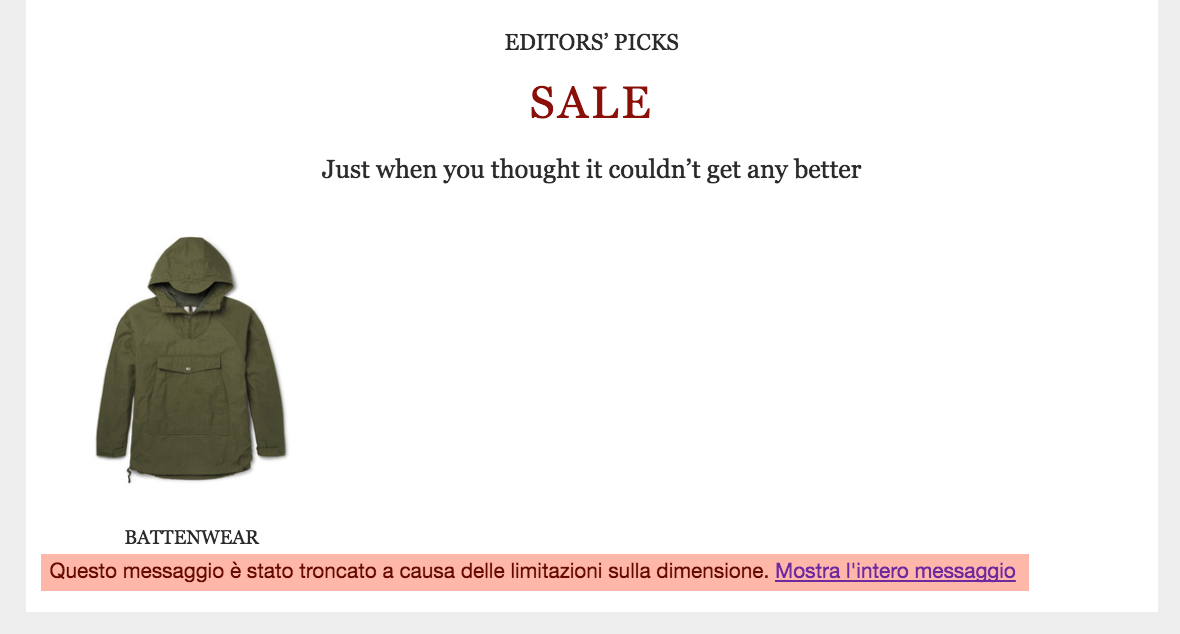
Libero notifies the subscriber that the email got clipped and offers a link to the full version of the message. However, the note on the bottom is easy to miss, which makes it likely that many subscribers won’t see the full message—and might miss any important CTAs on the bottom part of your email—when it gets clipped.
 |
Don’t get clippedCheck to see if your emails are being clipped in Libero and dozens of other popular email clients and devices using Litmus Checklist. |
Using image compression tools and keeping your code as clean and concise as possible can help cut down your email’s file size. You can learn more about this in our Ultimate Guide to Email File Size and Load Times.
HTML/CSS Support
|
The Basics |
|
|
Style support in head |
|
|
|
|
Media query support |
**
|
|
CSS attribute selector support |
|
|
Classes |
|
|
Ids |
|
|
Hover state |
Yes, only on links |
|
Images and Visuals |
|
|
Images enabled by default? |
|
|
Animated GIF support |
|
|
ALT text support |
|
|
Styled ALT text support |
|
|
Background images support |
|
|
HTML5 video support |
|
|
Spacing |
|
|
Padding |
|
|
Margin |
|
|
max-width |
|
|
Typography |
|
|
Headers |
|
|
Paragraphs |
|
|
Web fonts |
|
|
Auto linked address, phone number, or email address |
Email address linked, turned blue, and underlined |
|
Progressive Enhancement |
|
|
Border radius |
|
|
Interactivity — checkbox/ radio button support |
|
|
Animation — transitions/keyframe animation support |
|
|
CSS Grid |
|
**Rather than using just the width of the preview pane, media queries are activated based on the width of the entire window.
ENABLING LIBERO EMAIL PREVIEWS IN LITMUS
Libero is just one of dozens of popular email clients that you can preview in with Litmus. To help streamline your testing efforts, you can enable those clients that are most important to you when testing your email rendering. To add Libero to your default clients for testing, head over to the account settings in your Litmus account and choose “configure clients”.
WE’D LOVE TO HEAR FROM YOU
Did you discover a rendering quirk in Libero that we missed? Struggling with a code question specific to this email client? Let us know in the Community!
The post Libero Now Available in Litmus Email Previews appeared first on Litmus Software, Inc..